
Hands-on with the DockCase Mount Ling 2 Pro — handheld dock with a built-in capture card and space for up to 4TB of NVMe storage
DockCase is no stranger to Kickstarting unique SSD enclosures and docks, with the company’s Visual Smart M.2 enclosure making its way onto our list of the best SSD enclosures . The Mount Ling 2 Pro , however, is gunning for a spot among the best USB-C docks . It’s a dock for handhelds like the Steam Deck and Switch 2, an external enclosure for an NVMe SSD, and a game capture device, all packaged up in a dock that…
Hands-on with the DockCase Mount Ling 2 Pro — handheld dock with a built-in capture card and space for up to 4TB of NVMe storage
Mount Ling 2 Pro offers a lot of flexibility for a gaming dock.
DockCase is no stranger to Kickstarting unique SSD enclosures and docks, with the company’s Visual Smart M.2 enclosure making its way onto our list of the best SSD enclosures. The Mount Ling 2 Pro, however, is gunning for a spot among the best USB-C docks. It’s a dock for handhelds like the Steam Deck and Switch 2, an external enclosure for an NVMe SSD, and a game capture device, all packaged up in a dock that can show off your handheld and expand your port selection.
There are two versions of the dock: the standard Mount Ling 2 and the Pro version. The only difference between them is the internal capture card. The base version is $109 via an early bird deal while the Kickstarter gets underway, and the Pro version is $149. They’ll be priced at $199 and $249, respectively, after the early deals are gone.
It’s the world’s first “smart creator dock,” says DockCase, which is partially true. There are other docks that give you additional inputs, a stand, and capture capabilities with a handheld, and at a lower price. The AVerMedia X’TRA GO, for instance, offers all of that for $160. The differentiator here is the internal M.2 slot that can support up to 4TB of NVMe storage, with points to mount 2280, 2242, and 2230-sized drives. Of course, this external storage only works with platforms that normally support external storage (so, not the Switch or Switch 2).
For PC-adjacent handhelds running Windows or Linux, the Mount Ling 2 Pro is an expensive but useful dock that gives you capture, storage, and port expandability in one attractive package. For the Switch and Switch 2, the usefulness isn’t as clear. You can’t use the SSD with either platform, and Nintendo’s game of whack-a-mole with third-party accessories means a system update could break HDMI passthrough (and, in the process, the capture function of the dock).
Mount Ling Dock 2 specifications
DockCase says the Mount Ling 2 Pro supports the Steam Deck, ROG Ally, Switch, Switch 2, and “more,” presumably wrapping up other Windows- or Linux-based handhelds like the ROG Ally X Xbox or Lenovo Legion Go S. Switch and Switch 2 are supported, as well, though getting Nintendo’s handheld to connect properly isn’t always smooth.
The dock connects to your handheld with a USB 3.2 Gen Type-C connection capable of 10 Gbps, and DockCase includes a small, braided 40 Gbps cable in the box, along with two right-angle connectors. That single connection gives you up to 100W through the USB-C port, along with Gigabit Ethernet, an HDMI 2.0 connection (4K@60Hz), a single USB 3.2 Gen 2 Type-A port, and a USB 2.0 port. An additional USB-C connection serves as another USB 3.2 Gen 2 port on the Mount Ling 2, while it becomes the capture card output on the Pro model.
Interestingly, there’s also an optical audio output available. Although I don’t suspect most users will put it to use (HDMI transfers audio, as well), it’s a nice fallback if you plan on using the dock with a more elaborate audio setup. It’s a nice bonus, though I would’ve liked a 3.5mm audio jack as well, considering handhelds no longer have access to that connection.
Get Tom's Hardware's best news and in-depth reviews, straight to your inbox.
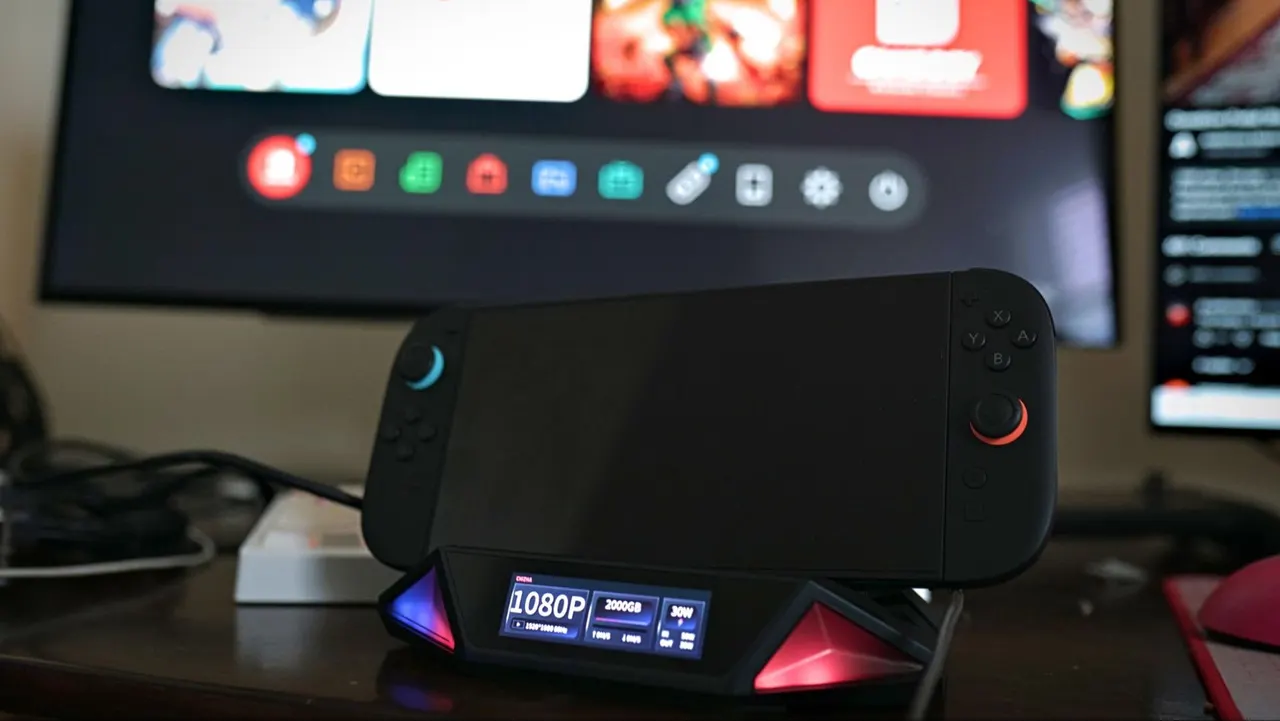
The dock itself is constructed almost entirely of plastic, and holding it in your hands, you can tell it’s filled with more air than hardware. It’s a sizable package at 8.4 x 7 x 3.5 inches. Outside of the shell, there’s a thick layer of firm silicone to rest your handheld on. There are grooves to provide a natural resting place for just about any handheld, as well as a deep central cut that fits the Switch and Switch 2 specifically.
You can install your SSD at the bottom of the dock, with mounting points for 2280, 2242, and 2230 drives. There's a single 40mm fan internally, as well as venting around the back and side edges, to keep the drive cool. The fan will automatically adjust its speed out of the box, but you’re free to manually adjust the speed or turn the fan off, if you want.
Unfortunately, there’s no room for a heatsink. The face of the drive sits nearly flush against the vented cover on the bottom of the dock. Even if you left the cover off, most heatsinks would push past the rubber feet and prop the dock up.
Using the Mount Ling 2 Pro dock
Setting up the Mount Ling 2 Pro is mostly a matter of plugging everything in and getting on your way. The dock goes through a connecting phase when you hook up a new device, and it’s finicky. Sometimes it would drop one part of the connection, like charging, while picking up another, particularly with the Switch 2. You want to have the dock fully connected before hooking up your host.
The main page of the dock’s screen provides HDMI, SSD, and power info at a glance, which is helpful to quickly check, for example, that the HDMI passthrough is operating at the correct resolution and refresh rate without digging into the settings. A swipe to the right brings up five quick-access settings, which just take you into the settings menu, while a swipe to the right gives you access to volume and fan controls. The volume adjustment on the dock is passed through to the host.
Swiping up instead gives you the full settings menu, which has more to monitor than adjust. You can see the SSD details (including SMART monitors), the status of USB connections, and your HDMI info, andother details about the dock. For settings, there are different HDMI transfer modes, in case you run into a broken handshake, along with power delivery settings if you need to roll back to PD 2.0.
For the dock itself, you have some small control over the fan and built-in lighting. For the fan, you can adjust the speed manually, turn it off, or leave it on the default automatic mode. The lighting settings are surprisingly bare. You can choose between blue, red, or a gradient between them, and that’s it. Otherwise, you can just dim or turn off the lights. If you find the screen and lights distracting, there’s a dedicated button on the back of the dock to turn all the lights off (including the screen).
Although the screen is responsive with minimal lag between swipes and taps, the software running here isn’t perfect. Particularly with the Switch 2, if I connected things in the wrong order, the dock would force itself to reboot, only sometimes picking up the Switch 2 when it came back. DockCase offers firmware updates over USB, and hopefully it gets a patch between units shipped to fix some of these quirks.
The firmware updates are a nice sign, but they bring up an unfortunate reality of creating a device for the Switch 2 without Nintendo’s seal of approval. Both the Switch and Switch 2 are infamously fickle with third-party docks and hubs. A system update could break compatibility, forcing a firmware update.
DockCase plays up Switch 2 support on its product page, and that is a big draw. However, the dock can’t get around the limitations that Nintendo itself has placed on its handheld. You may as well fill the SSD slot with concrete if you’re docking a Switch 2, and docking the device is troublesome. It took multiple emails for me to get the Switch 2 to pass through its HDMI signal at all. You have to connect everything in a specific way, and critically, have the Switch 2 already unlocked when you plug it into the bottom USB-C port; the top port won’t work.
With the Steam Deck, everything was seamless, and although I didn’t have a Windows handheld on hand to try out, I don’t anticipate there will be major issues. DockCase may offer a lot of functionality in a single box with the Mount Ling Pro 2, but it’s all operating over standard connections that are well supported in the Windows ecosystem.
You can use the SSD with the Steam Deck, though you’ll need to head to desktop mode to partition the drive and add a folder for Steam games. The process is similar on Windows handhelds if you’re using some sort of handheld-native overlay.
For the capture portion, it serves its purpose. Critically, DockCase doesn’t have any software for capturing or recording like the mainstream capture cards you’ll find from Elgato and AVerMedia, so you’ll need to use something else like OBS. For any of these types of recording/streaming platforms, the DockCase shows up as a simple video capture device, with resolution and frame rate determined by your settings on the host device (assuming it’s within that 4K60 limit that HDMI 2.0 is capable of).
There isn’t much of a need here for HDMI 2.1, considering the types of devices connecting to the Mount Ling Pro 2, though it would’ve been a nice upside. You can still push the refresh rate higher, just not at 4K. And in fairness to DockCase, the devices it’s targeting really have no business driving a 4K display.
Mount Ling 2 Pro SSD performance
You shouldn’t expect wonders out of SSD performance with the Mount Ling 2 Pro, given that it uses a USB 3.2 Gen 2 connection that’s only capable of up to 10 Gbps. High performance in an external enclosure is the game of Thunderbolt 5 docks with M.2 storage, which can often reach sequential reads above 5,000 MB/s over the 80 Gbps Thunderbolt 5 interface. Here, the connection will bottleneck your speeds, all the way down to typical PCIe 3.0 NVMe SSDs.
Still, in the context of gaming on a handheld, that isn’t the end of the world. It’s nice to have that much storage on tap for a device like the Steam Deck, which is otherwise only expandable with a larger internal SSmicroSDicro SD card.
In CrystalDiskMark, the Mount Ling 2 Pro landed with sequential reads and writes around 820 MB/s, with random performance far lower. We tested with a 2 TB WD_Black SN770, which is a PCIe 4.0 drive that boasts sequential reads up to 5150 MB/s when installed directly in a motherboard. In the Mount Ling 2 Pro, it behaves more like an external SSD like the SK hynix Beetle X31 2TB, naturally hamstrung by the connection.
Overall Mount Ling 2 Pro impressions
The Mount Ling 2 Pro does a lot, combining external storage, a capture card, and an attractive dock into a single package that works with both PC handhelds and the Nintendo Switch 2. The SSD performance isn’t great, as is to be expected out of a dock that uses a 10 Gbps USB link for connection, but that downside isn’t much of a concern considering the devices this dock targets.
Although Switch 2 support is a big upside, it’s also fickle. You don’t get access to the SSD, and the connection can fail if you don’t follow the order of operations for connection. The Mount Ling 2 Pro makes sense if you have a Switch 2 and a PC handheld of some kind, but as a pure Switch 2 dock, it doesn’t make much sense. You’d be better off buying an external capture card for use with the official dock.
Jake Roach is the Senior CPU Analyst at Tom’s Hardware, writing reviews, news, and features about the latest consumer and workstation processors.