
HomePod Mini 2 first look: Three things I love and one disappointment
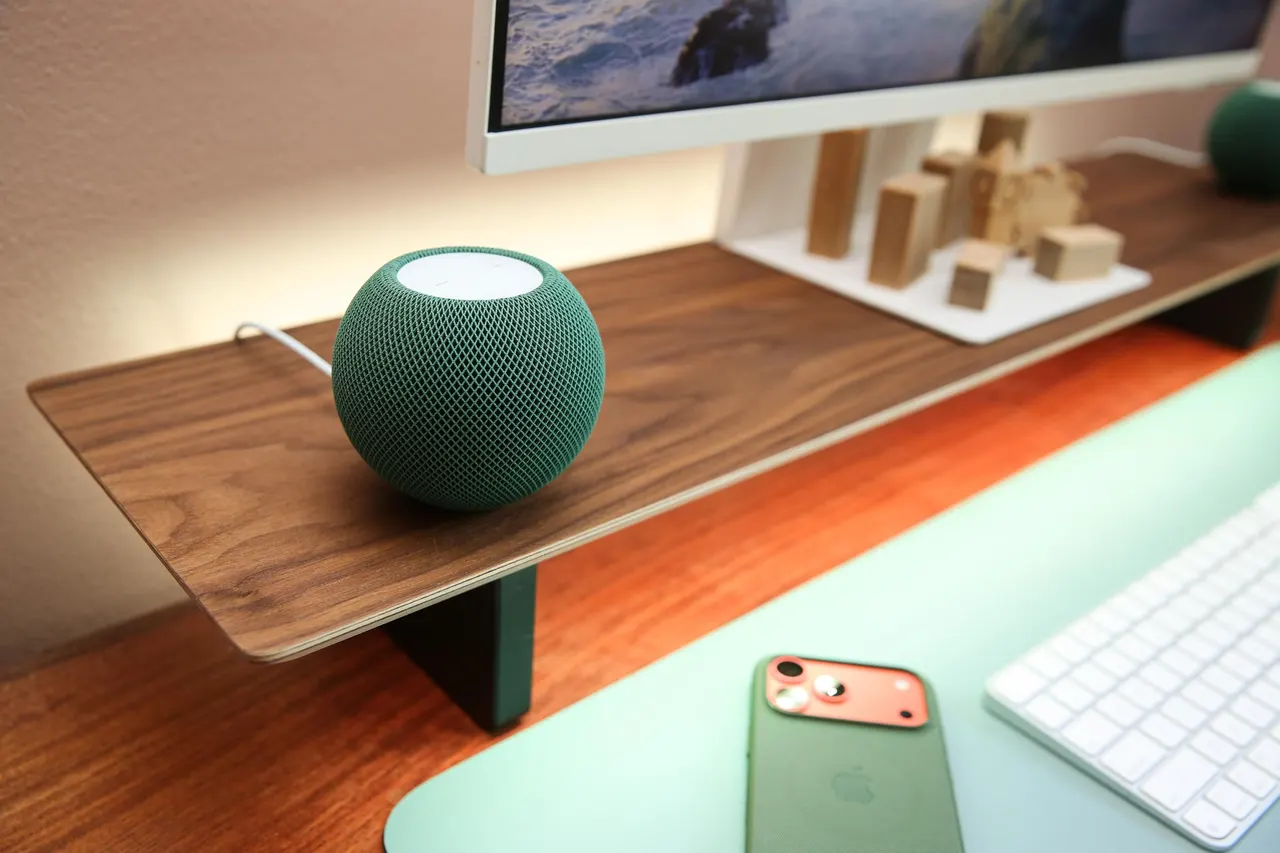
Apple’s second-generation HomePod Mini is a nice upgrade, but the biggest improvement hasn’t arrived yet. | Photo: Jennifer Pattison Tuohy / The Verge When I first heard about the new $149 HomePod Mini 2 at Apple's Welcome Home event last month, I was disappointed. It's been six years since Apple launched its entry-level smart speaker, and all it got in the second gen was a chip bump, some color glowy stuff, and…
When I first heard about the new $149 HomePod Mini 2 at Apple’s Welcome Home event last month, I was disappointed. It’s been six years since Apple launched its entry-level smart speaker, and all it got in the second gen was a chip bump, some color glowy stuff, and better AirPlay? For $50 more than the original, which launched at $99, Apple didn’t even upgrade the sound system. It felt like the company phoned this one in.
HomePod Mini 2 first look: Three things I love and one disappointment
The new Mini is faster, quieter, and gorgeous in green, but its upgraded Mac speaker feature didn’t work for me.
If you buy something from a link, The Verge may earn a commission. See our ethics statement.
Now that I’ve got my hands on a couple and set them up in my home office, I’m more enthused. The Mini 2 is so much faster than the first-gen Mini, playing music in a few seconds and responding to smart home commands just as quickly. If you’re fed up with standing over your HomePod waiting for it to finally do what you asked, then that alone is worth the upgrade.
Here are my three favorite features of the new Mini 2 after spending a day with it, and my one big disappointment.
Siri is much snappier and much less chatty
The biggest upgrade for the Mini 2 is Siri AI, but that isn’t available yet. Apple says it’s coming “later” in a software update. However, the basic smart voice assistant has definitely improved. Siri on the Mini 2 is much snappier than on the first-gen Mini, regularly responding in under three seconds. This is thanks to a newer, faster processor (the S10, up from the S5) and Wi-Fi 6E support (up from Wi-Fi 4).
When I asked Siri to play Taylor Swift, a song started in a couple of seconds. It correctly told me who won this year’s World Series in under two seconds, and turned off the light or opened the shades in under three seconds.
That’s a huge improvement over the up to 10 seconds I often have to wait for Siri to get things done on the first-gen Mini. However, asking something harder, like who will win the US midterm elections, still brings up the familiar offer to look at some web results on my iPhone. As I said, Siri AI isn’t here yet.
The other new behavior I am really enjoying is that when I ask Siri to perform a smart home action, such as open the shades or turn on the lights, instead of “OK, Jen,” or “One sec,” followed by a wordy confirmation of the action that I often get on the first-gen Mini, the Mini 2 just does it and doesn’t talk back. It’s not silent for every action, but it’s quiet enough to be a noticeable improvement.
This Mini is gorgeous in green and sounds great
The green color is divine. This is the prettiest small smart speaker I’ve seen — and I’ve tried them all.
Yes, Amazon’s Echo Dot Max’s purple is fun, the Google Home Speaker’s pale green is elegant, but Apple’s deep green is seriously sophisticated. It’s a color that fits in really well in various places around my home, and I’m so glad the company finally released a green option. It’s a big improvement over the slightly garish yellow and orange of the prior-gen Minis and the best of the new colors.
I saw all the colors in person at Apple’s Welcome Home event, and while the pink is pretty, it’s very pale, and the blue is functionally identical to the first-gen blue, maybe a shade lighter. While a lot of folks will be happy with black (don’t get white unless you plan to dust it regularly), the green is my new go-to.
Two green HomePod Mini 2s look so good on the walnut Nanoleaf monitor stand I’m testing; it’s like my office got an instant upgrade. And while Apple didn’t update the speakers in the Mini 2, it’s still a very good speaker for its size, doing a fine job with Bad Bunny’s bass and delivering clear mids and vocals. While $300 is steep for computer speakers, two as a stereo pair in my office definitely delivered on room-filling sound.
You can finally disable touch
A few weeks ago I fumbled for my phone on my nightstand and accidentally hit the top of my HomePod Mini, blaring music in the bedroom at 3AM. My husband was not happy.
A new setting in the Home app now lets you lock the Mini’s top controls. This goes for all HomePods, old and new, and it’s a major quality-of-life upgrade. How often do you intentionally touch the top of your HomePod? I bet far less often than accidentally!
The other new trick for the top of the HomePod is Sound Glow. This makes the LEDs display colors that match the album art of the song you’re playing (it’s also backward compatible with the first-gen Mini and the second-gen HomePod). It’s neat, but only works with Apple Music and Podcasts and is so subtle that I don’t feel it adds much to my music-listening experience.
Signature feature fail
Beyond the speed improvement, the other new feature I was excited about is the HomePod Mini 2’s ability to be the default speaker for your Mac using what Apple calls “a responsive and persistent AirPlay connection.” This creates a wireless point-to-point connection between the computer and the HomePod.
You can pair a single speaker or a stereo pair to your Mac, and the feature also works with the second-gen HomePod. (Two or four HomePod Mini 2s can also now be part of a surround sound setup using the new Apple TV 4K.)
Disappointingly, I couldn’t get the Mac speaker set up to work. I have the required hardware: a Mac that supports Wi-Fi 6E, running the public release of macOS 27.2 (a Mac Mini M4), and HomePods on HomePod Software 27.2. But the Sound pane in my Mac’s settings didn’t offer an option to set a HomePod via AirPlay as the default sound output.
The Mini showed up and connected like any other AirPlay speaker, with the same flaws as regular AirPlay — occasional artifacting, drop-offs, and some lag with notification sounds — along with the Mac defaulting to its built-in speakers when the computer restarts, or anytime I activate Siri on the HomePod. I also tried with a stereo pair of Minis, but they also played over regular AirPlay.
The chip bump and speed improvements make this a bigger upgrade than it initially seemed
According to a 9to5Mac’s hands-on, when the persistent AirPlay is enabled, the HomePod Mini should show up as a default system output device in the System Information, and there should be an option to enable it under “Play sound effects through” in the Sound pane in System Settings, but neither was there for me. I have seen other reports of the same issue.
I tried resetting both HomePods completely after they updated to 27.2 out of the box (I was on the HomePod Software betas, but 27.2 is now in general release), and the feature still isn’t working. I reached out to Apple, but the company hasn’t responded to my requests yet; I’ll update this article if I hear back or find a solution.
There’s more to come
I’ve only been testing the Mini 2 for two days, and while the real test will come when it gets its Siri AI upgrade, the chip bump and speed improvements make this a bigger upgrade than it initially seemed. Apple does need to work on the setup process for Mac pairing; this feature has a lot of potential, but feels unfinished.
I plan to do a full review once Siri AI launches, and of course compare it to Apple’s big new smart home release: the upcoming $299 Apple HomeView smart display, which is also a Home hub and offers more functionality than the Mini thanks to its screen.