
CRKD Ult Pro Wireless Switch 2/PC Controller Review – Feature-Packed, But Not Quite Premium
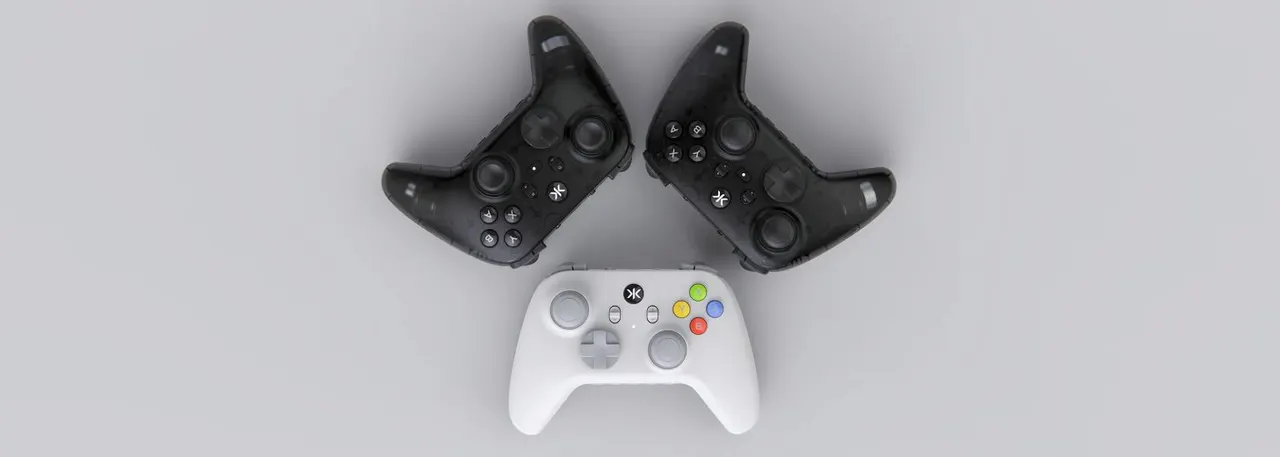
The controller market has become increasingly competitive over the past few years. Features that were once reserved for expensive enthusiast-grade gamepads have rapidly trickled down into more affordable products, forcing manufacturers to compete on both specifications and user experience. With the ULT PRO, CRKD is clearly aiming at the enthusiast crowd. Available in dedicated PC and Nintendo Switch versions, the…
CRKD Ult Pro Wireless Gaming Controller
October 2026
Type
Wireless controller
Price
€76,95
The controller market has become increasingly competitive over the past few years. Features that were once reserved for expensive enthusiast-grade gamepads have rapidly trickled down into more affordable products, forcing manufacturers to compete on both specifications and user experience.
With the ULT PRO, CRKD is clearly aiming at the enthusiast crowd. Available in dedicated PC and Nintendo Switch versions, the controller packs an impressive list of features, including TMR thumbsticks, Hall Effect triggers, six remappable buttons, multiple wireless connectivity options, extensive customization, and an included charging dock. The Switch version is available in both Smoke Black and the eye-catching PAL Grey colourway, while the PC version is offered exclusively in Smoke Black. On paper, the ULT PRO looks like one of the most compelling controllers in its price range.
After spending considerable time with the controller across Nintendo Switch 2 and PC, I came away impressed by the technology CRKD has managed to include for the money. Unfortunately, I was equally surprised by how often the physical user experience failed to live up to the promise of its specification sheet.
Specifications
As said, the Ult Pro offers plenty of features, as been can be seen in the specs list below:
Design and build quality
Buyers can choose between three ULT PRO variants. The PC version ships in Smoke Black, while the Switch version is available in both Smoke Black and PAL Grey. Although all variants share the same underlying hardware, the PAL Grey model is undoubtedly the standout. Its light-grey shell and colourful face buttons immediately brought the PAL-era Super Nintendo to mind, while the overall aesthetic also carries subtle Dreamcast vibes. Retro gaming fans will likely appreciate the nostalgic styling, and it's easily one of the most attractive third-party controllers I've tested recently. The overall shape adopts a familiar asymmetrical thumbstick layout that will feel immediately comfortable to Xbox players. Ergonomics are excellent, grip comfort is good, and longer gaming sessions never became fatiguing.
Unfortunately, this is where my biggest issue with the ULT PRO begins. While the controller looks premium, it doesn't consistently feel premium.
The build quality is perfectly acceptable and the controller never feels fragile, but compared directly to competitors from 8BitDo and even the less expensive EasySMX S10, the overall fit, finish, and tactile experience feel less refined. The plastics feel slightly cheaper, the buttons are less satisfying to press, and the controller simply lacks some of the quality feel I'd expect from a product targeting the premium segment. Nothing feels bad. It just never feels exceptional.
Buttons and Controls
Functionally, the ULT PRO performs exactly as intended. The TMR thumbsticks are easily one of the controller's standout features. Throughout testing, they consistently delivered precise and responsive inputs across a variety of genres, from shooters and racing games to action-adventure titles and platformers. Movement feels smooth, centering is reliable, and the sticks offer the kind of accuracy enthusiasts expect from a modern premium controller. Combined with the Companion App's stick tuning options and No Deadzone Mode, users have a surprising amount of control over stick behaviour and responsiveness. The Hall Effect triggers are another highlight. The trigger toggle system allows players to switch between shorter, more click-like activations and traditional longer travel, while trigger sensitivity can be adjusted through the Companion App. It's a genuinely useful feature rather than a marketing bullet point, allowing the controller to adapt to different genres and player preferences.
The actual button feel, however, is less impressive.
The face buttons work perfectly well, but lack the crisp, premium actuation found on some competing controllers. Likewise, while the triggers are technically impressive, neither the triggers nor the bumpers provide the tactile satisfaction I expected from a controller built around enthusiast-grade specifications. The best way I can describe the ULT PRO is that it feels like a controller where most of the development budget was spent on features rather than refinement.
That feeling is reinforced by the implementation of the system buttons. The + and - buttons are surprisingly small and understated for controls that are used so often. Their size and low-profile design mean they don't stand out enough from the surrounding controls, making them less intuitive to locate by touch alone. More than once I found myself briefly glancing down at the controller to confirm I was pressing the correct button.
Connectivity and software
The ULT PRO offers three connectivity options: Bluetooth, 2.4GHz wireless via the included USB dongle, and wired USB-C operation. In addition, a physical platform slider on the rear of the controller allows users to quickly switch between supported devices without navigating menus or relying on awkward button combinations. It's a simple feature, but one that proves genuinely useful for players who regularly move between Switch, PC, and other devices.
My experience with connectivity was largely positive, though not entirely without issues. Bluetooth pairing worked flawlessly throughout testing. Connections were established quickly and remained stable across extended gaming sessions, making it the most trouble-free way to use the controller in my experience. The bundled 2.4GHz dongle proved slightly more temperamental initially. Early setup wasn't quite as seamless as I expected, with pairing requiring more trial and error than it should have. Fortunately, once everything was configured correctly, the connection became reliable and remained stable throughout the remainder of my testing. While those early frustrations weren't enough to significantly impact my experience, it's worth noting that setup wasn't quite as polished as some competing controllers.
The CRKD Companion App is one of the ULT PRO's strongest features. Beyond basic button remapping, the software allows users to adjust trigger sensitivity, configure macros, customize stick behaviour, manage multiple onboard profiles, and enable features such as No Deadzone Mode. Profile switching can be performed directly from the controller itself, making it easy to move between different configurations for various games and genres. The controller also supports adjustable rumble strength and turbo functionality. While neither feature will be essential for every player, they further reinforce the sheer amount of customization CRKD has managed to squeeze into a controller at this price point.
Simply put, the ULT PRO is one of the most configurable controllers I've used in this price range. Whether you're the kind of player who wants to tweak trigger response curves, fine-tune stick sensitivity, or create multiple profiles for different games, there's no shortage of options here. The hardware may not always feel as premium as some rivals, but when it comes to functionality and software flexibility, CRKD has delivered an impressively complete package
One Surprising Omission
For a controller designed with Nintendo Switch 2 players in mind, one omission stands out.
The ULT PRO cannot wake the Switch 2 remotely. Ordinarily this wouldn't be a major criticism, but it becomes difficult to ignore when less expensive alternatives already support the feature.
A controller such as the EasySMX S10 not only offers Switch 2 wake functionality but also delivers a more premium-feeling physical experience despite costing less. While the ULT PRO counters with a significantly more advanced feature set, the absence of wake support feels like a genuine oversight given how frequently Switch owners use the function. It's a small feature on paper, but a meaningful one in daily use.
Performance
Ultimately, no controller lives or dies by its specification sheet. What matters most is how it performs once a game is actually running, and this is where the ULT PRO makes its strongest case for itself. The TMR thumbsticks are excellent. They feel smooth, accurate, and highly responsive, offering precise control across a wide variety of genres. Whether I was making small aiming adjustments in shooters, navigating platforming sequences, or making rapid directional inputs in action games, the sticks consistently delivered the level of precision I'd expect from a modern enthusiast-grade controller. The Hall Effect triggers also perform well in practice. Being able to switch between shorter trigger travel for faster inputs and longer travel for games that benefit from greater control adds a degree of versatility that many controllers at this price point still lack. Combined with the trigger sensitivity adjustments available through the Companion App, the ULT PRO can be tailored to suit a wide range of playstyles.
Input latency was never an issue during my testing. Regardless of whether I was connected through Bluetooth, the 2.4GHz dongle, or USB-C, inputs felt immediate and responsive. While competitive players will undoubtedly appreciate the controller's support for a 1000Hz polling rate in wired PC mode, even during normal use the ULT PRO never gave me reason to question its responsiveness.
The controller's ergonomics also contribute positively to gaming performance. The asymmetrical layout feels natural, the grip shape remains comfortable during longer sessions, and the overall weight strikes a nice balance between feeling substantial without becoming tiring. While I wasn't entirely convinced by some aspects of the controller's build quality and button feel, I never found the controller physically uncomfortable to use.
What's particularly impressive is how much functionality is immediately available to players who enjoy customizing their controls. The additional remappable buttons, profile presets, trigger adjustments, and extensive software options allow the ULT PRO to adapt to different genres far more effectively than many traditional controllers. Players who jump between competitive shooters, racing games, RPGs, and platformers can create distinct profiles and quickly switch between them without needing to constantly revisit the software.
The somewhat frustrating reality of the ULT PRO is that its gaming performance is genuinely excellent. The underlying technology, feature set, and responsiveness all deliver exactly what CRKD promises. In many respects, it performs like a controller that should be competing with products well above its price range.
The problem is that once the game ends, you're immediately reminded of the areas where CRKD focused more heavily on features than refinement. The ULT PRO excels while you're playing, but some aspects of the physical experience, including the button feel, build quality, and overall tactile feedback, prevent it from leaving quite the same lasting impression as its strongest competitors.
Closing thoughts
The CRKD ULT PRO is one of the most interesting controllers I've tested this year. It offers an outstanding collection of enthusiast-grade features at a very competitive price. TMR thumbsticks, Hall Effect triggers, six remappable buttons, extensive software customization, multiple connectivity options, and an included charging dock create a package that is difficult to ignore.
Yet despite all of those strengths, I couldn't shake the feeling that the controller is more impressive on a specification sheet than it is in my hands. The build quality is good, but not class-leading. The buttons are functional, but not especially satisfying. The bumpers and triggers are packed with technology, but don't feel particularly premium. The small + and - buttons lack tactile presence, and the omission of Switch 2 wake-up support is disappointing.
Ultimately, CRKD has built a controller that wins the specification battle. What it hasn't quite done is win the feel test.
For players prioritizing features above all else, the ULT PRO represents excellent value. For those who place equal importance on materials, button feel, and overall refinement, some competitors may still hold the advantage.
* review sample provided by the manufacturer
You can find additional information about our standard review process and ethics policy here.
The CRKD ULT PRO wins the specification battle with an outstanding collection of enthusiast-grade features, but its less refined build quality, underwhelming button feel, and missing Switch 2 wake support prevent it from delivering the truly premium experience its feature set promises.
- Excellent TMR thumbsticks
- Hall Effect triggers with adjustable travel
- Outstanding feature set for the price
- Included charging dock
- Extensive software customization
- Strong gaming performance
- Comfortable ergonomics
- Attractive PAL Grey colourway
Pros
- Doesn't feel as premium as its feature set suggests
- Face buttons lack refinement
- Bumpers and triggers feel less satisfying than expected
- Small + and - buttons are less intuitive than they should be
- No Nintendo Switch 2 wake-up support
- Initial 2.4GHz setup can be frustrating
Cons
Follow Wccftech on Google to get more of our news coverage in your feeds.
Comments
Comments appear after moderation. Persian and English conversations are separate.