
Apple MacBook Pro (14-inch, M6) review: Speedy M6 chip slips into comfortable shoes
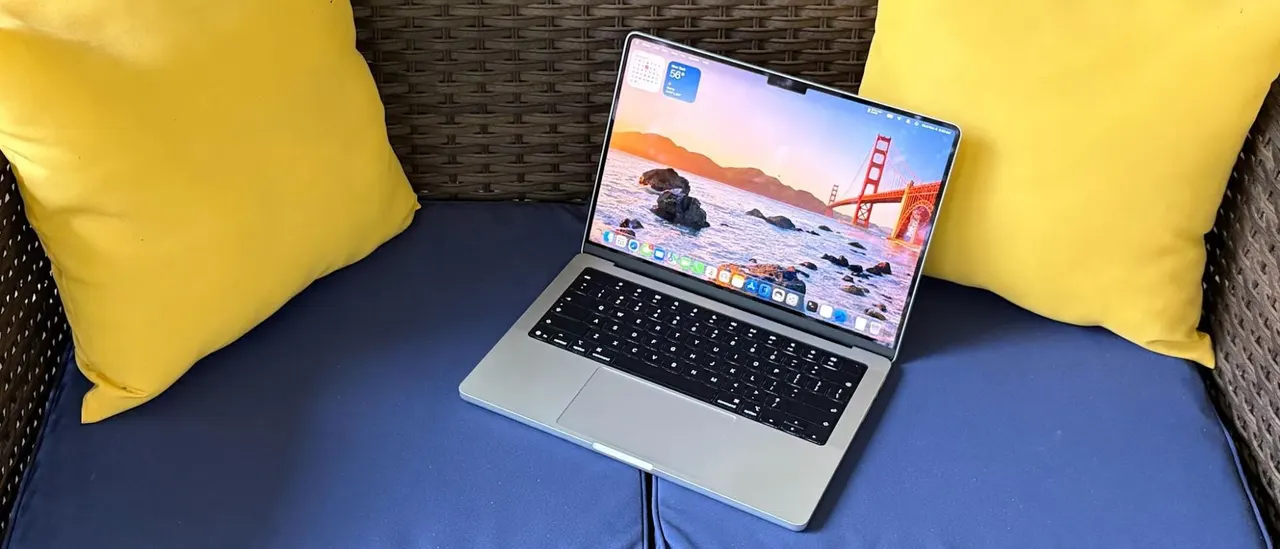
It’s that time of the year again, which means that Apple has released yet another refreshed 14-inch MacBook Pro using a legacy chassis. While it looks the same as last year’s M5 models on the outside, it has some key hardware upgrades underneath that address performance and connectivity. This time around, we have a MacBook Pro using the new M6 chip that was first introduced in the refreshed Mac Mini . In addition…
Tom's Hardware Verdict
While the base MacBook Pro design is getting a bit tired, Apple’s new M6 chip gives the 14-inch MacBook even more pep in its step.
Reasons to buy
- + M6 continues Apple’s track record of solid year-over-year performance upgrades
- + Wi-Fi 7 finally makes an appearance
- + Impeccable build quality
Reasons to avoid
- - Memory and SSD upgrades are more expensive than ever before
- - Design is starting to look a bit stale after 5 years
Why you can trust Tom's Hardware
Our expert reviewers spend hours testing and comparing products and services so you can choose the best for you. Find out more about how we test.
It’s that time of the year again, which means that Apple has released yet another refreshed 14-inch MacBook Pro using a legacy chassis. While it looks the same as last year’s M5 models on the outside, it has some key hardware upgrades underneath that address performance and connectivity.
This time around, we have a MacBook Pro using the new M6 chip that was first introduced in the refreshed Mac Mini. In addition, Apple has outfitted the MacBook Pro with Wi-Fi 7 and Bluetooth 6 connectivity courtesy of the in-house Apple N1 chip.
Thanks to industry-wide price hikes on memory and storage, Apple’s 14-inch MacBook Pro now starts at $1,999.
Design of the MacBook Pro (M6, 14-inch)
Apple has been using the same design for its entry-level MacBook Pro since 2021, and there are no changes this year (if you want a slightly refreshed design, check out the touch screen-enabled 14- and 16-inch MacBook Pros). It’s still a good-looking laptop, but it’s showing its age. Our MacBook Pro review unit came finished in silver instead of space black. While space black looks great, it’s a fingerprint magnet, so many people might prefer the lighter finish, which better hides your skin oils.
The notch at the top of the display now seems archaic, especially after seeing the Dynamic Island on the pricier MacBook Pros. The notch is always staring back at you, even though I have mostly gotten used to it over the years. The main thing going in the notch’s favor is that it resides in the same space as the menu bar, which limits the visual annoyance.
View Original
View Original
View Original
View Original
View Original
View Original
My only other niggle with the design is one that I’ve harped about in previous MacBook Pro reviews: the cutout in the keyboard deck that aids in lifting the lid has sharp corners, which can jab your palms while typing.
As with previous MacBook Pro generations, you’ll find three Thunderbolt 4 ports (Thunderbolt 5 is not available on M6 models), a full-size SDXC card reader, HDMI 2.1, a 3.5 mm audio jack, and a MagSafe 3 connector.
Get Tom's Hardware's best news and in-depth reviews, straight to your inbox.
Our 14-inch MacBook review unit measures 12.31 x 8.71 x 0.61 inches and weighs 3.4 pounds, the same as last year’s model with the M5. For comparison, the Gigabyte Aero X16 measures 14 x 9.9 x 0.78 inches and 4.2 pounds, while the Dell XPS 14 comes in at 12.19 x 8.26 x 0.6 inches and weighs 3 pounds.
MacBook Pro Specifications (M6, 14-inch)
Productivity and Graphics Performance on the MacBook Pro (M5, 14-inch)
Our 14-inch MacBook Pro review unit features a 12-core CPU and 12-core GPU version of Apple’s new M6 SoC. This is the same configuration as the Mac Mini that we reviewed in September, except that our laptop review unit includes 16GB of unified LPDDR5x memory compared to 24GB. Rounding out the specs is a standard 1TB SSD.
Slow and steady wins the race in silicon advances. In every productivity benchmark, our M6 MacBook Pro not only outshone the previous-generation M5 MacBook Pro, but it also trounced the prosumer Gigabyte Aero X16 (AMD Ryzen AI 7 350) and Dell XPS 14 (Intel Core Ultra X7 358H) Windows 11 laptops that we pitted it against.
View Original
View Original
View Original
View Original
View Original
Starting out with the Geekbench 6 synthetic CPU benchmark, our M6 review unit put up a modest 10% gain in single-core performance over the M5 (4,752 versus 4,288). Switching to multi-core performance, that performance delta grew to just over 18%. Of the two Windows 11 laptops, the XPS 14 came the closest, putting up single- and multi-core scores of 2,867 and 16,927, respectively.
Apple appears to have held the line when it comes to SSD performance year-over-year. 2025's M5 MacBook Pro managed 1917.35 MBps in our in-house 25GB file transfer test. Things changed little this year, as our M6 MacBook Pro came in at 1914.23 MBps. The Aero X16 carried the baton for the Windows 11 field with a result of 1,480.57 MBps.
Our Handbrake test consists of transcoding a 4K video file to 1080p. The new M6 MacBook Pro review finished the job in a brisk 2 minutes and 50 seconds, while the M5 version took 3 minutes and 31 seconds to complete the task.
Our stress test for productivity laptops centers around Cinebench 2026, which we run 10 times back-to-back, tallying multi-core scores along the way. The M6 MacBook Pro started with a score of 5,026.55 and hovered around 5,440 for the remainder of the runs.
The M5 includes a 12-core GPU (each core features a dedicated neural accelerator), which promises up to a 30 percent uplift in performance compared to the M5.
Although the base MacBook Pro isn’t what we’d consider a gaming beast, it did manage 53.7 frames per second (FPS) at 1800 x 1125 resolution in Cyberpunk 2077 using the “For this Mac” preset and 32.66 FPS at 3024 x 1890. This compares to 47.65 FPS and 31.47 FPS, respectively, for the M5 MacBook Pro.
Display on the MacBook Pro (M6, 14-inch)
Apple’s M6-equipped 14-inch MacBook Pro continues to use an IPS display with mini LED backlighting. As before, you get a 3,024 x 1,964 resolution panel with a 120 Hz refresh rate.
While the mini LED panel looks good, it’s not nearly as capable as the touch-enabled PROLED XDR display found on its pricier siblings. Although you can equip the MacBook Pro with a nano-texture display for $150, our review unit didn’t have it.
Being that I’m a huge fan of Sylvester Stallone’s Rocky films (well, the first four), I pulled up the second trailer for I Play Rocky, which is set to release later this month. The design aesthetic of the film is, of course, distinctly 1970s, and the mini LED panel did a good job of presenting the muted colors (mostly warm earth tones).
As I’m still in shock over the passing of Patrick Stewart, I watched a sizable portion of Star Trek: First Contact on the screen. Again, the display performed well, with major kudos during the opening battle scene where Federation ships are battling the Borg. The orange explosions, red phaser blasts, and the Borg’s green cutting beams vividly danced across the screen. The blackness of space wasn’t quite as deep as I witnessed with an OLED screen side-by-side, but it’s still good.
Our MacBook Pro review unit was even brighter than last year’s model, if only by a slim margin (571.4 nits versus 558 nits). That performance was still well ahead of the OLED panels in the Windows laptops.
Those similarities extended to color performance, which tracked nearly identically to the preceding M5 MacBook Pro, which was a dead ringer for its M4 predecessor. Our instrumented tests showed 81.5 percent coverage of DCI-P3 and 115.1 percent of the sRGB. Although the XPS 14’s OLED panel was no match for brightness (358 nits), it pipped the MacBook Pro in color performance (89.7 percent DCI-P3, 126.6 percent sRGB).
Keyboard and Touchpad on the Apple MacBook Pro (M6, 14-inch)
As with all the other exterior design elements of the M6 MacBook Pro, the keyboard remains unchanged. To me, that’s a good thing, as it’s one of the things I love the most about Apple laptops. As someone who lived through Apple’s horrible butterfly keys on the 12-inch MacBook and subsequent MacBook Pro models, the return to the venerable switches was a return to sanity on Apple’s part.
Apple isn’t the type of company that would equip its laptops with RGB keyboards, so you’ll get single-zone white LED key backlighting. Although the thought of a MacBook Pro with RGB lighting brings a slight smirk to my face, I’m perfectly fine with Apple’s monochromatic approach.
I used the keyhero.com typing test, as I do with all laptops I review, and settled in with 93 words per minute at 95 percent accuracy. Those figures track with what I achieve with other Apple and Windows laptops.
Like all MacBooks (except for the entry-level Neo), our MacBook Pro features a large haptic trackpad that measures 5 x 3 inches. The glass surface makes gliding with your finger or thumb easy-peasy, and the simulated “click” is satisfying.
Audio on the Apple MacBook Pro (M6, 14-inch)
We’re sure you’re noticing a theme in this review, but the audio system in our MacBook Pro review unit remains unchanged compared to its earlier M5 and M4 counterparts. What that means is that you’ll find a six-speaker system that includes support for major audio formats like Dolby Digital, Dolby Atmos, Dolby Digital Plus, and Apple Spatial Audio.
I’m a sucker for acoustic guitar, and one of the greats of the 2000s is John Mayer. Perhaps my favorite John Mayer song is “3x5” from his debut album, which my girlfriend at the time (now wife) and I played over and over again and witnessed several times in concert. On the MacBook Pro’s speakers, the acoustic guitar packs just as much of a punch as John’s breathy vocals pelting out vivid lyrics like, "Today, skies are painted colors of a cowboy cliché."
I got so lost in the audio experience that I found myself listening to the entire Room for Squares album and being transported back to my college days.
Upgradeability of the Apple MacBook Pro (M6, 14-inch)
While most Windows laptops give you some semblance of upgradeability, allowing you to upgrade at the very least storage, Wi-Fi/Bluetooth, and sometimes memory, you’ll find no such luxuries in MacBook land. There are four pentalobe screws on the bottom of the laptop, but once you remove the cover, there’s nothing of note that’s upgradeable. The M6 chip with its integrated 16GB of memory can’t be replaced, nor can the 1TB SSD – both packages are soldered onto the motherboard. As with all MacBooks, you’ll need to settle on how much RAM and storage you want at purchase time. If you get it wrong, you’ll have to live with that config until it’s time to upgrade your laptop again.
Battery Life on the Apple MacBook Pro (M6, 14-inch)
If there’s one thing that you can count on when it comes to MacBooks, it’s battery life. It’s pretty common for MacBooks to last for 18 or more hours in our battery life test, which consists of browsing the web, running OpenGL tests, and streaming video at 150 nits of brightness.
Our MacBook Pro review unit was no exception, lasting 19 hours and 5 minutes thanks to its 72 WHr battery. This was nearly a one-hour improvement over its M5 counterpart, which is a testament to the efficiency gains that Apple is able to achieve with the 2-nanometer process node.
Heat on the Apple MacBook Pro (M6, 14-inch)
We measured skin temperature on the MacBook Pro during our Cinebench 2026 stress test. Unlike the cheaper MacBook Airs, which are fanless, the MacBook Pro’s two internal fans kick into gear quite quickly to dissipate heat.
The hottest point was near the left exhaust vent, which measured 106 degrees Fahrenheit, with 105 F seen between the G and H keys. Given its distance from the toasty parts of the laptop, the touchpad remained cool to the touch at 78 F. The touchpad was much cooler at 82.8 F.
We use TG Pro to measure internal temperatures while running the Cinebench 2026 stress test. While TG Pro doesn’t have full support for the M6 yet, the Power Manager dies reported peak temperatures of 80 degrees Celsius (C) for the SoC. The overall system temperature, which takes an average of several components (i.e., power supply, battery, SSD, logic board, etc.), was 43 degrees C.
Webcam on the Apple MacBook Pro (M6, 14-inch)
The 12MP Center Stage camera that’s been featured in the last two MacBook Pro generations has made a reappearance this year. All of the superlatives that I had for the M5 MacBook Pro are relevant to my current review unit. Namely, image quality was impressive across the board, in both bright and low-light conditions.
Unlike some other laptop webcams that skew my darker skin color or apply smoothing algorithms that make my skin look like a Tootsie Roll, the camera picked up the wrinkles around my eyes and accurately represented the grays in my beard.
Software on the Apple MacBook Pro (M6, 14-inch)
The M6 MacBook Pro ships with macOS 27 Golden Gate preinstalled. You can liken the shift from macOS 26 Tahoe to macOS 27 Golden Gate to the OS X 10.5 Leopard to Mac OS X 10.6 Snow Leopard transition. In other words, macOS 27 is more about making the operating system more reliable and faster rather than bombarding users with new features. You can read more about macOS 27 Golden Gate in my M6 Mac Mini review.
Just like Windows 11, macOS comes with a slew of apps preinstalled upon first boot. Some of the standouts include GarageBand, Apple’s productivity suite (Keynote, Pages, Numbers), Apple TV, iMovie, and Home (Apple’s smart home application). With the exception of Apple TV, the other apps are productivity utilities meant to enhance the user experience and get work done. You won’t find typical bloatware like app/shortcuts for services like Dropbox or antivirus programs like McAfee as you would on Windows 11 laptops.
Apple MacBook Pro (M6, 14-inch) Configurations and Warranty
When opting for the 14-inch MacBook Pro with M6 processor, you’re looking at a starting price of $1,999. In addition to the M6 processor, you get 16GB of RAM and a 1TB SSD (the configuration of our review unit).
From there, you can opt for 24GB (+$200) or 32AM (+$400) of RAM, and 2TB (+$500) or 4TB (+$1,500) of storage. There are also two standalone options that you can add: the nano-texture display for $150 and a 96-watt power adapter for an extra $20.
The MacBook Pro has a standard one-year warranty. However, you can pick up AppleCare+ for $99.99/year or $9.99/month. The coverage adds unlimited repairs covering accidents, 24/7 priority tech support, and battery replacement.
Bottom Line
When it comes to everything you see on the outside, Apple’s latest 14-inch MacBook Pro is more of the same: same display, same chassis, same keyboard, and the same great build quality. But true to form, Apple has steadily focused on improving performance year-over-year, and we see that again with the new M6 SoC.
You’ll see anywhere from a 10% to 20% uplift across the board, depending on whether you’re dealing with single- or multi-threaded apps. On top of that, efficiency gains have netted nearly an additional hour of battery life over its M5-powered predecessor. And Apple has finally given the MacBook Pro Wi-Fi 7 and Bluetooth 6.0 support.
The M6 MacBook Pro doesn’t have the OLED touchscreen, more svelte design, or Dynamic Island of the all-new MacBook Pros, but it also started at a price that is $900 less than those systems. With that said, the $1,999 price of our review unit is still a lot of money to ask for a laptop featuring just 16GB of RAM and a 1TB SSD. And you don’t even get an OLED screen at that price.
But given the price of memory and storage these days, $1,999 isn’t exactly out of the ordinary. A Dell XPS 14 configured with an Intel Core Ultra 5 325, 16GB of RAM, 1TB SSD, and a 2.8K OLED display is $2,549. We are truly living in unprecedented times, and while it’s hard to reset our expectations concerning the price of tech, the M6 MacBook Pro remains a solid entry in a highly competitive market.
Brandon Hill is a senior editor at Tom's Hardware. He has written about PC and Mac tech since the late 1990s with bylines at AnandTech, DailyTech, and Hot Hardware. When he is not consuming copious amounts of tech news, he can be found enjoying the NC mountains or the beach with his wife and two sons.